
helix deploy builds your project and ships it to the Helix platform in one command. Functions run on a managed runtime per project that routes each request to the correct handler, SPA assets are served from the CDN, and the app is live at https://{project-id}.helix-app.ai. The first deploy provisions the project and records its ID; later deploys update it in place.
The build pipeline
Deploy builds and bundles your functions, then packages anything needed to run them:
- Reads
helix.config.ts. Validates the project ID, workspace ID, and auth aliases. - Scans
functions/. Builds the route map from the file system and identifies scheduled functions. - Builds and bundles functions. Compiles handlers into a deployable bundle that routes each request to the correct handler.
- Extracts configs. Reads the
defineFunctionanddefineScheduleconfigs from each file to build the deployment manifest (schemas, trigger configs, routes). - Builds the SPA. Runs
vite buildifapp/exists. - Generates the manifest. A JSON file describing all functions, routes, triggers, schemas, and assets.
.output/
├── manifest.json          # Deployment descriptor
├── functions/
│   └── handler.js         # Bundled entry point that routes to each handler
└── public/                # Vite build output (if a SPA exists)
    ├── index.html
    └── assets/
What helix deploy does
- Builds the project if it isn’t already built.
- Uploads the function bundle, creating or updating the project’s runtime.
- Uploads SPA assets for CDN delivery.
- Registers triggers. Cron schedules are reconciled and staged disabled, then activated once the new code is live, so a failed deploy can’t leave a schedule firing against unpublished code (see scheduled functions).
- Updates routing so function requests reach the new runtime.
- Activates the deployment. Traffic switches to the new version.
On the first deploy, the CLI provisions the project, records its ID, and prints the project ID and live URL. It asks for a workspace if you haven’t set one.
Deploy options
# Deploy the project in the current directory
helix deploy

# Name the project on its first deploy, when it gets provisioned
helix deploy --name "Deal desk"

# Deploy a different target by naming its config file
helix deploy --config helix.production.config.ts
--name applies to the first deploy only, when the project is provisioned. Later deploys upload a new artifact to the project already named in the config file.
--config <path> selects the config file, and with it the deploy target, instead of the default ./helix.config.ts. Each target lives in its own config file pointing at its own workspace and project, so a deploy always lands where the file says. The HELIX_CONFIG environment variable has the same effect, which is handy in CI; the flag wins when both are set. See the configuration model and the deploy command reference.
Wait for the rollout
helix deploy returns once the upload is accepted, while the platform is still building; the status it prints is deploying. Add --wait and the command keeps polling until the deployment is ready, exiting 1 with the build errors printed if it fails. For a deployment you already started, helix deployment wait <deploymentId> does the same.
helix deploy --wait
helix deployment wait <deploymentId>
Deploy from CI
helix ci init generates a GitHub Actions workflow that runs helix deploy --wait on merge or on demand, authenticated with a Tray API user token. See Deploy from CI.
Production URL and routing
Projects are served on their Helix app URL. All traffic arrives at the CDN on the project’s subdomain and routes by content type:
https://{project-id}.helix-app.ai/
├── /                      → SPA (index.html)
├── /about                 → SPA (client-side route)
├── /api/v1/users          → Function
└── /assets/main-abc123.js → Static asset (CDN)
Route priority matches the dev server:
- Function routes. Exact match against the manifest’s route table, forwarded to the project’s runtime.
- Static files. SPA assets served from the CDN cache.
- SPA fallback.
index.htmlfor all unmatched paths.
The project ID URL is the address every project has, and it never changes. Once your organization has set a namespace, a project can also answer at a readable address such as https://invoices-acme.helix-app.ai, with the same routing and the same login. See project URLs.
Deployment history
The Deployments tab in the dashboard lists every available deployment for the project, newest first.
| Column | Contents |
|---|---|
| Status | Live, Deploying, Restoring, Restore failed, Build failed, or Superseded |
| Deployment ID | The identifier to quote in a support request, and the one a trace’s header ties back to |
| By | Who deployed it |
| When | When it was deployed |
A deployment created by restoring an earlier one also shows which deployment it restored. Selecting a row opens its build output: warnings, errors, and the authentications it declares.
How long previous deployments are kept
| Deployment | Kept for |
|---|---|
| The live deployment | As long as it is live |
| The deployment immediately before the live one | As long as it holds that position |
| Any other deployment | 30 days from when it was deployed |
If your app is switched back to an older deployment, the newer deployments it replaced are also kept, so you can move forward again.
When a deployment expires, its bundle, the source it was built from, and its record are deleted. It disappears from the dashboard’s deployment history and from helix deployment get, and it cannot be recovered.
Restore a previous deployment
To go back to an earlier version, open the project’s Deployments tab and choose Restore on the deployment you want. Restore rebuilds and redeploys that deployment’s stored source through the normal build pipeline, producing a new deployment rather than reviving the old one.
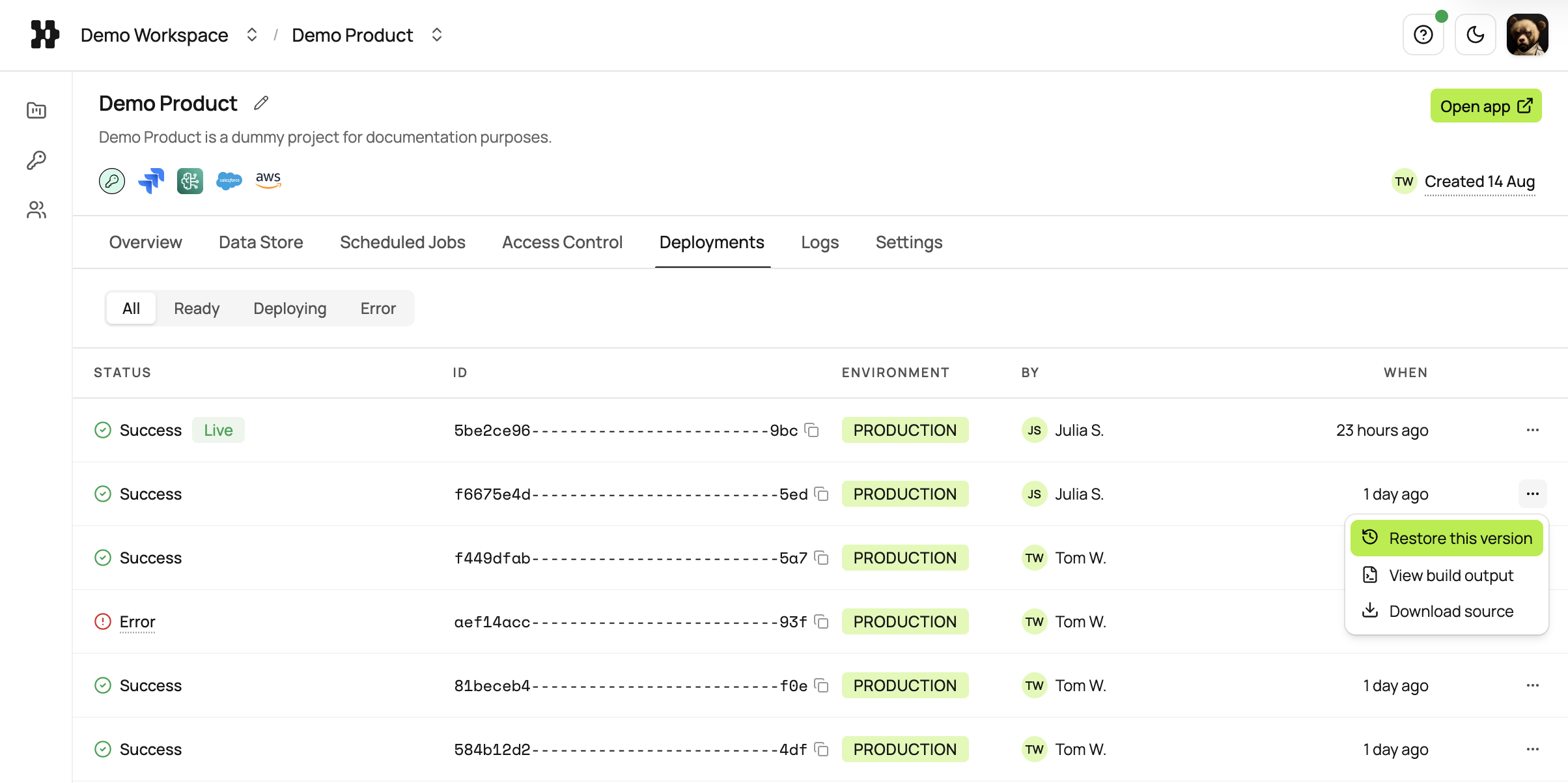
A few things follow from that:
- It takes as long as a normal deploy. Minutes, not seconds, because it is one.
- The rebuild isn’t guaranteed byte-identical to what ran before. Dependencies resolve fresh against the same lockfile.
- A restore can fail. If the rebuild fails, your app keeps serving the version that was live when you started. Restoring never takes your app offline to try.
- Data isn’t reverted. The key-value store and anything your app wrote to a connected third-party service stay exactly as the newer version left them. Only code comes back.
- Your own working tree is untouched. Your next
helix deploystill ships whatever is in your local project, moving forward from the restored version. If you want to keep developing from exactly what’s now live, download that deployment’s source first.
Restoring needs the same access as deploying the project; see identity and roles. While the live deployment is a restore, the Deployments tab shows a banner naming which deployment it restored and when, as a reminder before the next deploy moves the project forward again.
Download a deployment’s source
Download on any deployment in the Deployments tab, including a failed one, fetches the exact source that build ran from. Use it to restart local work from a known-good version, or to diagnose a failed build offline. Downloading needs the same access as deploying the project.